Structured data in SEO: the DNA of your store
In SEO, structured data is a few lines of code your shoppers don’t see. In a shared format, it tells Google: here is a product, its price, its stock, its customer rating. Google can then show this information under your link. In the anatomy of your site, it’s the DNA of your store. On WordPress, your plugins already write a good part of it: your job is to check what they say.
What Google does with your structured data
In its introduction to structured data, Google presents it as a standardized format that helps it understand a page. It suggests the format that is easiest for you to implement and maintain: in most cases, JSON-LD. JSON-LD is a block of code placed in the page, apart from the text your shoppers read.
On a product page, it can bring up the price, stock, shipping, returns and rating. Google separates two displays: product snippets and merchant listings, which are for pages where shoppers can buy.
Its general guidelines warn that Google doesn’t guarantee this display, even with correct markup.
WooCommerce and Rank Math already mark up your product pages
According to Google’s page on ecommerce, a plugin for your platform can add the structured data for you.
WooCommerce marks up each product page automatically, according to its documentation on product data. Since version 3.5.6, it no longer does so on category pages.
Rank Math, the SEO plugin I use on this site, takes the data you enter in WooCommerce. Its documentation on WooCommerce products says it adds the average rating and your customers’ reviews by itself. When a price has no end date, it adds one to avoid a Google warning.
Before you install a generator or paste code from a guide, look at what your plugins already write.
FAQ markup no longer shows in Google
Some well-ranked French guides still present question-and-answer (FAQ) markup as a way to stand out in Google.
Since May 7, 2026, the FAQ rich result no longer appears in Google. Google announced it in its documentation changelog, then removed the help page in June. Search Engine Journal adds that you can leave the code in place: it no longer produces anything visible.
If you added a FAQ to your product pages to take up more space in Google, it no longer does. Keep it if it answers your shoppers’ real questions.
What markup isn’t allowed to claim
For Google, markup describes what the page shows. Its guidelines forbid content readers can’t see, fake reviews and anything misleading. What EU law asks of your reviews is explained on the page about the immune system of your store.
If something goes wrong, Google can take manual action: the page loses its rich result. Google states that its ranking isn’t affected.
A brand that controls its own reviews gets no stars on its company page. The rules on review snippets target pages marked up as Organization or LocalBusiness. Stars remain possible on product pages, under the conditions described on the page about the stomach of your store.
Markup also carries your product names and descriptions. I apply the same claims rules to it as to the page, presented with the mouth of your store. That’s my reading: the regulations don’t mention page code as an example.
Checking your structured data with Google’s tool
The Rich Results Test is free. Paste the address of a product page: the tool lists the types it found, the errors and the warnings. The page must be reachable without a password, according to Search Console Help. If your store is in maintenance mode, use the Code option and paste the page’s code.
On a French product page, look at three points:
- The tool finds a Product item.
- The price and currency match the page: euros for your French store, not dollars.
- The rating matches the reviews visible on the page.
I also count the Product items: one product sold, one item. If there are two, I look for the plugin or code that adds the second.
In Search Console, the “Manual actions” report tells you whether Google has penalized your structured data.
My test product page in Google’s tool
For this page, I set up a demo store with WooCommerce and Rank Math. I left their markup settings untouched. It holds one fictional product, the « Crème de démonstration », and a test review I wrote myself. It isn’t indexed and sells nothing.
Without a photo, the Rich Results Test accepts the product and the review. It rejects the merchant listing: the image field is missing. Once I added the image, all three were valid. Optional fields remain: brand or GTIN code, return policy, shipping.
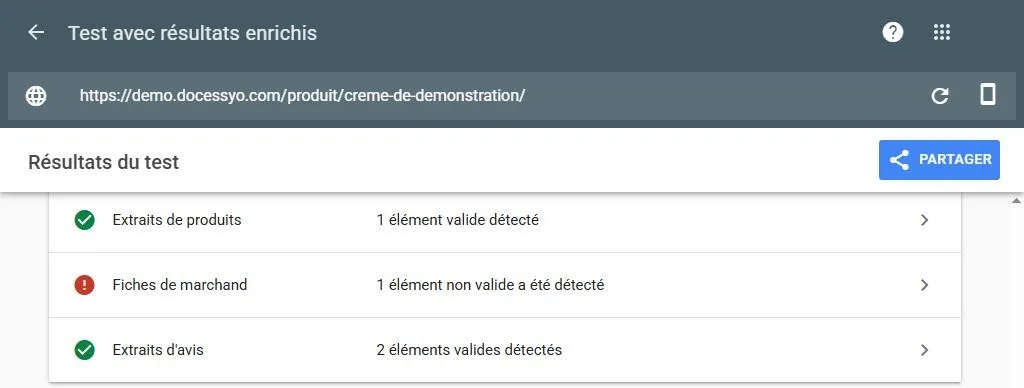
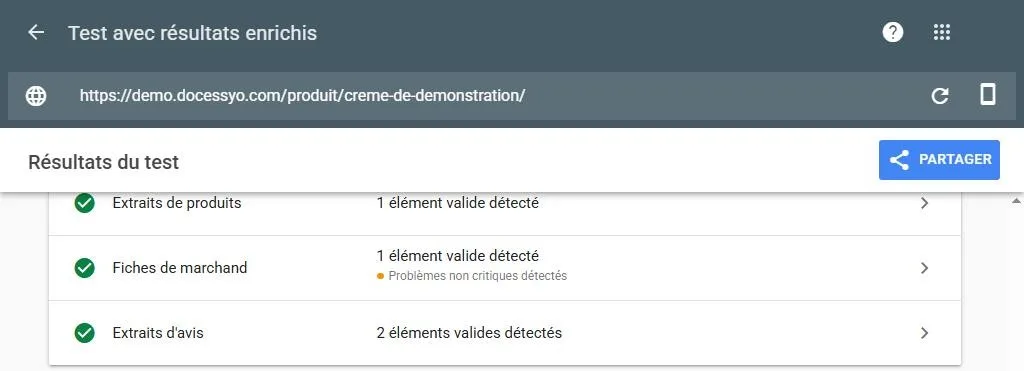
Three details came up during the test:
- The currency: my store was in US dollars, with an address in California, the default values in WooCommerce’s code. A US brand that copies its settings to a French store can carry them over too.
- The product name: Rank Math adds the site name to it, « Crème de démonstration – Boutique demo Doc Essyo ».
- The review author: the markup showed my WordPress login, because I hadn’t chosen a display name in my profile. I replaced it with a public name.
Here is an excerpt of the offer Rank Math wrote, once I switched the currency to euros:
"offers": {
  "@type": "Offer",
  "price": "12.90",
  "priceCurrency": "EUR",
  "priceValidUntil": "2027-12-31",
  "availability": "http://schema.org/InStock"
}
The page holds a single Product item, written by Rank Math. I found no WooCommerce markup on it.
My test page was set to noindex. The tool showed a message saying Google can’t access the URL, while its details showed the page fetched and the markup read.
What does the audit check in your structured data?
Your structured data isn’t part of the free check-up questionnaire.
The SEO audit runs your main page templates through the test tool: homepage, category, product page. It flags errors and duplicates. It also points out prices or ratings that differ from the page, and markup that no longer serves any purpose.
The Doc’s references
| Idea | Source | Level | Date checked |
|---|---|---|---|
| Standardized format to understand a page; the format easiest to implement and maintain, in most cases JSON-LD | Google Search Central, “Intro to how structured data markup works” | 1 | November 17, 2026 |
| Product snippets and merchant listings (pages where shoppers can buy); return policies | Google Search Central, “Intro to Product structured data on Google” | 1 | November 17, 2026 |
| No guaranteed display; visible content only; no fake reviews or misleading content; manual action with no effect on ranking | Google Search Central, “General structured data guidelines” | 1 | November 17, 2026 |
| A platform plugin can add structured data | Google Search Central, “Structured data for ecommerce sites” | 1 | November 17, 2026 |
| No stars for Organization or LocalBusiness when the entity controls its reviews | Google Search Central, “Review snippet structured data” | 1 | November 17, 2026 |
| FAQ rich result stopped on May 7, 2026, documentation removed in June 2026 | Google Search Central, “Latest documentation updates” (May 8 and June 15, 2026) | 1 | November 17, 2026 |
| FAQ code can stay, with no visible result | Matt G. Southern, Search Engine Journal, “Google Drops FAQ Rich Results From Search” (May 10, 2026) | 3 | November 17, 2026 |
| WooCommerce marks up product pages automatically, no longer categories since version 3.5.6 | WooCommerce, “Structured data for products” (official GitHub wiki) | 1 | November 17, 2026 |
| Rank Math takes WooCommerce data, adds the average rating, reviews and a price end date | Rank Math, “How to Use Product Schema for WooCommerce Products” | 1 | November 17, 2026 |
| Test by URL or by code; types found, errors, warnings; page reachable without login | Search Console Help, “Rich Results Test” | 1 | November 17, 2026 |
| WooCommerce default values: US dollar (USD), address in California (US:CA) | WooCommerce, general settings, source code (class-wc-settings-general.php) | 1 | October 28, 2026 |
| Test page: merchant listing rejected without an image, valid with one; a single Product item; site name added to the product name; WordPress login as review author (since replaced by a public name); “Google can’t access” message on the noindex page | My own test on a demo store (WooCommerce, Rank Math), Google’s Rich Results Test | Own observation | October 28, 2026 |
| FAQ structured data presented as a way to show questions and answers in your Google result | Seo Sans Migraine, “Données structurées SEO : c’est quoi ? + tuto facile” (published November 17, 2025), in French | 4 | November 17, 2026 |
| FAQ listed among the rich results structured data gives access to | Kyxar, “Données structurées : un levier stratégique pour le SEO et l’IA” (no date shown), in French | 4 | November 17, 2026 |
Level 1 means a primary source: official documentation. Level 3 means a reference media outlet, used as a starting point. Level 4 shows a habit of the trade and proves no rule. “Own observation” means a check I ran myself, with its date and conditions. My sources method explains how I choose and rank sources.