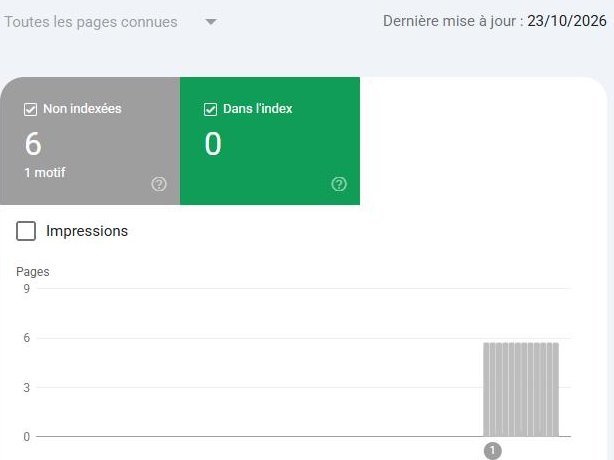
Your website isn’t showing up on Google for one of four reasons. Google doesn’t know it, a setting blocks indexing, Google set it aside, or it ranks it too far down. Let’s start the health check with a one-minute test: type site:yoursite.fr into Google. I write for independent beauty and wellness brands that sell in France, on WordPress or WooCommerce. My own site went through this: on October 23, 2026, it had 0 pages in the index.
Is your website really missing from Google?
Type site: followed by your domain, with no space, into Google’s search bar. If pages show up, your site is indexed, meaning Google has stored it. If nothing shows up, Google displays no page from your site. Google also advises turning off SafeSearch, a filter that hides some results.
| What you see | What it means | Where to look next |
|---|---|---|
| No pages | Site unknown to Google, blocked or penalized | New site, blocking settings, penalty |
| Only a few pages | Some pages stay out of the index | Search Console report |
| Your English pages, not your French ones | Language versions Google doesn’t see or doesn’t link | Addresses, redirects, hreflang |
| Your pages, but not for your searches | Site indexed, ranked low | Content and competition |
This test has a limit: Google states that site: doesn’t necessarily return every indexed page. For a specific address, Google recommends the URL Inspection tool in Search Console.
What Google has to do before showing you
Google goes through three stages. First it crawls the web to discover your pages, mostly by following links. Then it analyzes each page and decides whether to store it: that’s indexing. Finally, for each search, it picks the pages to show and their order.
A block at the first stage calls for a different fix than poor ranking. Google guarantees none of these stages, even on a site with no errors.
Your site is new: how long should you wait?
According to Google’s help, it can take from a day or two to a few weeks, depending on the case. After you submit a sitemap, Google asks you to wait at least a week before assuming there’s a problem.
Here is what I saw on docessyo.com. I opened the site to search engines on October 30, 2026. I submitted the sitemap and requested indexing for two pages. On November 2, site:docessyo.com showed 10 addresses, without my Services page. This test doesn’t necessarily list every indexed page, so that absence proves nothing.
This observation covers a single site and promises no timeline for yours.
The setting that blocks a WordPress or WooCommerce store
A site hidden during its build can stay hidden after launch. Start with these four checks: they take a few minutes.
The WordPress checkbox
In Settings > Reading, check that the box “Discourage search engines from indexing this site” is unticked. When ticked, it adds a noindex tag to your pages, an instruction asking search engines not to index them.
My site was in this state before launch. The October 23 report showed 0 indexed pages. It listed 6 pages with the reason “Excluded by ‘noindex’ tag” (the report was in French). I wanted that setting during the build. On a store that is already live, it cuts you off from Google without any message your customers can see.
WooCommerce “Coming soon” mode
New WooCommerce stores switch to Coming soon mode after setup. Visitors then see a holding page, and only authorized users or people with a private link see the store. Depending on how new the site is, this mode covers the whole site or only the store pages. In the WooCommerce settings, open the Site visibility tab: the store should be Live.
The WooCommerce documentation says nothing about search engines for this mode. So test the live address in Search Console to see what Google receives.
The password
Google’s help lists password protection among the causes of non-indexing. The Search Console report then shows a 401 error, or unauthorized request. Open your site in a private window: if a login form appears, remove that protection from public pages.
The robots.txt file
The robots.txt file tells crawlers which parts of the site not to explore. One rule that is too broad can block a large part of it. Google flags this case in Search Console with the reason “Blocked by robots.txt”.
A page blocked by robots.txt can still stay in Google. The crawler can’t reach the page, so it never sees its noindex tag.
What Search Console says about your excluded pages
Search Console is Google’s free tool for monitoring your site. Open the Page indexing report: it gives the number of indexed pages, then the reason for each exclusion. Here are four reasons from this report.
| Reason shown | What it means | What to do |
|---|---|---|
| Excluded by ‘noindex’ tag | Your site asks Google not to index these pages | Remove the tag if the pages should appear on Google |
| Discovered – currently not indexed | Google knows the address and postponed crawling it, usually to avoid overloading the site | Wait; my advice: check your internal links too |
| Crawled – currently not indexed | Google read the page without keeping it for now; Google calls this common | For an important page, use URL Inspection; my advice: review what the page offers |
| Duplicate page | Google chose another address as the reference | Check that it kept the right version |
Don’t aim for 100% of pages indexed. Google writes that you shouldn’t expect every address on your site to be in the index. Duplicates and pages without useful information stay out. In a store, the pages that count are your categories, your product pages and your homepage.
For a specific page, use URL Inspection. It shows for example “URL is not on Google” and offers a “Request indexing” button. Here too, Google doesn’t guarantee the result of that request.
Your English site shows up, your French pages don’t
You sell in the US or the UK and you’ve added French pages. Your brand comes up on Google in English, and your French pages stay invisible. Google’s guide to multilingual sites points to four checks.
The language of the visible text
Google determines a page’s language from its visible content, not from the lang attribute in the code or from the address. A French page whose menus, buttons and descriptions are still half in English sends a mixed signal.
One address per language
Google recommends a different address for each language version, such as /fr/ or a French domain. If your site switches language through a cookie or the browser’s settings at the same address, Google may only ever see one version.
Automatic redirects
Google advises against redirecting visitors by their assumed language or location. Its crawler usually crawls from the US and doesn’t state a preferred language. A store that sends every US visitor to the English site can hide its French pages from Google this way.
Hreflang tags
Hreflang tags tell Google that your English and French pages are versions of each other, so it can show each searcher the right one. According to Google’s page on localized versions, each version must list itself and all the others. If one page doesn’t link back, Google may ignore the tags.
To check, run URL Inspection on one of your French product pages, then open its code and look for hreflang. The voice of your store page adds one more case: an English title tag left on a French page.
Your site is indexed, but nobody finds it
If site: shows your pages, the problem changes: Google knows you but ranks you too far down. Your brand can come first on its own name and stay invisible for « crème hydratante visage » (face moisturizer).
Three checks to run, page by page:
- The page uses the words your French shoppers type.
- The product page has text of its own, absent from your resellers’ sites.
- Other pages on your site link to it.
A page with no internal link stays hard to find, because Google discovers pages mostly through links. The internal linking of your store serves that purpose. For the text, the page on product pages details what I check. The title shown in the results matters too: see the page on the title tag and meta description.
Site bought, redesigned or penalized: three special cases
Your site used to show up, then disappeared? Or you took it over from someone else? Google then suggests three checks.
A manual action
A manual action is a penalty applied by a person at Google. It can remove part or all of the site from the results. Open the Manual actions report in Search Console: a green check mark means no action is in progress. Otherwise, fix every affected page, then request a review. The answer can take several days or weeks.
A security issue
Google also asks you to look at the Security issues report. This check matters most if you bought or inherited a site.
A redesign without redirects
After a redesign, your old addresses should send visitors to the new ones with a 301 redirect, a permanent move instruction. Without it, Google finds missing pages where your known pages used to be.
Frequently asked questions
How can I show up on Google faster?
First check that nothing blocks your site, then request indexing of your homepage in Search Console. Link your pages to each other and get other sites to mention you. Buying links to rank higher breaks Google’s rules.
Do I have to pay Google to show up?
Not for organic results. Google writes that it doesn’t accept payment to crawl a site more often or rank it higher.
Do I need a sitemap?
No. Google considers it usually unnecessary for a small, well-linked site, about 500 pages or fewer. It stays useful for a new site with few external links, or for a large catalog. A sitemap helps Google discover your pages, without guaranteeing they get indexed.
Where to start with your beauty or wellness store?
Run the site: test today. No pages shown: open Search Console. Then check the WordPress box, Coming soon mode and the password. English pages but no French ones: check addresses, redirects and hreflang. Pages shown but no visits: work on your categories and best-selling product pages first.
For a first opinion on your site, the free SEO check-up takes 7 to 15 questions. Your result shows up right away, with no email. You can then ask me for a call. The ecommerce SEO audit checks your homepage, your categories and your product pages.
The Doc’s references
| Idea | Source | Level | Date checked |
|---|---|---|---|
| Check with site:, SafeSearch, timelines, manual actions, security, redirects | Search Console Help, “Why is my page missing from Google Search?” | 1 | November 17, 2026 |
| site: doesn’t necessarily return every indexed page | Google Search Central, “How to use the site: search operator” | 1 | November 17, 2026 |
| Crawling, indexing, serving; no guarantee; no payment accepted | Google Search Central, “In-depth guide to how Google Search works” | 1 | November 17, 2026 |
| Discovery through links | Google Search Central, “SEO Starter Guide” | 1 | November 17, 2026 |
| Buying links for ranking against the rules, except qualified links | Google Search Central, “Spam policies for Google web search” | 1 | November 17, 2026 |
| Noindex, and a page blocked by robots.txt that stays visible | Google Search Central, “Block search indexing with noindex” | 1 | November 17, 2026 |
| Report reasons including 401; “Crawled – currently not indexed” common; no full indexing to expect | Search Console Help, “Page indexing report” | 1 | November 17, 2026 |
| URL Inspection and indexing requests without guarantee | Search Console Help, “URL Inspection tool” | 1 | November 17, 2026 |
| Manual actions and review requests | Search Console Help, “Manual actions report” | 1 | November 17, 2026 |
| Sitemap optional, no guarantee | Google Search Central, “Learn about sitemaps” | 1 | November 17, 2026 |
| Language from visible content; one address per language; no automatic redirects by language or location; crawler mostly from the US | Google Search Central, “Managing multi-regional and multilingual sites” | 1 | November 17, 2026 |
| Hreflang: each version lists itself and all the others, otherwise tags may be ignored | Google Search Central, “Tell Google about localized versions of your page” | 1 | November 17, 2026 |
| WordPress visibility checkbox | WordPress, “Settings Reading screen” | 1 | November 17, 2026 |
| WooCommerce Coming soon mode | WooCommerce, “Coming soon mode” | 1 | November 17, 2026 |
| docessyo.com: 0 indexed pages, 6 pages in noindex, October 23, 2026 report; 10 addresses with site: on November 2, 2026, Google France | Search Console and Google search for docessyo.com | Own observation | November 2, 2026 |
Level 1 means a primary source: Google’s own documentation or the official documentation of WordPress and WooCommerce. “Own observation” means a check I ran myself, with its date and conditions. My sources method explains how I choose and rank sources.